Pour · Wine scanner & cellar
Track your wine bottles on iPhone
Keep the bottles you own, the wines you want, and the ones you have finished in a personal cellar you can check before shopping or choosing dinner.
By Pour · Updated
How can I keep track of wine bottles on my phone?
Use Pour to scan or search for a wine, confirm its identity, and save it with quantity and purchase details. Separate bottles you own from Wishlist entries and finished wines. Update records when you buy or drink wine. Collection records are stored on your device; do not assume automatic synchronization between devices.
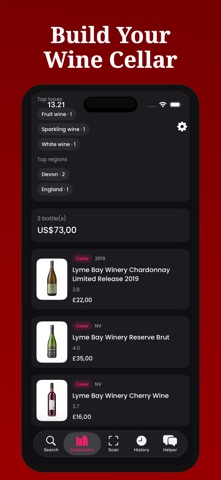
Three lists for three decisions
| List | Put this here | When to check it |
|---|---|---|
| Cellar | Bottles you own, with accurate quantities | Before opening or buying wine |
| Wishlist | Wines you would like to try | When planning purchases |
| Finished | Wines you have drunk | When remembering what worked |
Set up your first bottle
- Scan a label or search for the wine.
- Confirm its details and choose Add to collection.
- Record quantity, purchase price, currency, and purchase date.
- Choose Cellar or Wishlist, then save.
- Open Collections to review bottles and update them as your rack changes.
Make it part of your routine
After shopping: add purchases while putting them away. Before dinner: check what you own and explore pairing ideas. After opening: update quantity or finished status and write your own note. This small cycle keeps a digital inventory useful.
Purchase records and personal notes
Record what you paid rather than relying on estimated market values. Keep tasting notes in your own words so a generated description does not replace your memory. “Bright and fresh with dinner; would buy again” tells you something useful the next time you see that bottle.
Where the data lives
Collections are stored on your device. Do not assume an automatic shared cellar or synchronization between devices. Scanning, searching, and AI assistance need a connection. For a separate spreadsheet, use the free inventory template; it is not an app import/export feature.
Start with the next purchase
You do not have to catalogue everything today. Add the next bottle you buy or one shelf you use often. If you only have a picture of wine you enjoyed, import the label photo and start with a wishlist entry. Some features require a subscription; review the offer in the app.