Pour · Wine scanner & cellar
How to keep track of a wine collection
A useful inventory answers three questions: what do I own, how many bottles are left, and would I buy this wine again? Start there, and add detail only when it helps.
By Pour · Updated
What should a wine inventory include?
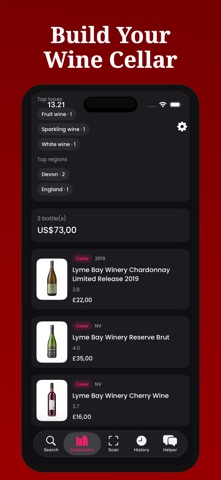
Start with wine name, producer, vintage, quantity, purchase details, and status. Add your own notes when useful. Pour can organize saved bottles into Cellar, Wishlist, and Finished lists. The free CSV linked below is a separate spreadsheet template; it is not an app import or export function.
Start with one shelf
Pick one shelf, scan or search each wine, and record the vintage and quantity. Count duplicate bottles together, but keep different vintages separate. You can add the rest of the collection gradually.
Your minimum wine inventory
| Field | Example | Why it helps |
|---|---|---|
| Wine and producer | Example Estate Reserve | Recognize the bottle |
| Vintage | 2022 | Separate releases |
| Quantity | 2 | Know what is left |
| Price and currency | 24 USD | Remember what you paid |
| Status | Cellar, wishlist, or finished | Separate bottles owned from wanted |
| Personal notes | Enjoyed with dinner; buy again | Remember your preference |
Download the free wine inventory CSV
This standalone spreadsheet includes an example row and a storage-location column. It is not an import or export feature in Pour.
Add a bottle in Pour
- Scan or search for the wine. Check the result against the bottle.
- Choose Add to collection. Set quantity, purchase price, currency, and purchase date.
- Select Cellar for a bottle you own, or Wishlist for one you want to try.
- Open Collections. Use the Cellar, Wishlist, and Finished lists to find the right group.
Build a two-minute habit
Record purchases when you put them away. After opening a bottle, update quantity or finished status and add a short note. Before shopping, check the cellar and wishlist. This small routine prevents the inventory from drifting away from the rack.
Know the limits of an inventory app
A scanner reduces typing but cannot count your bottles. Your purchase price is more useful for household records than an AI estimate. Collections are stored locally on your device; do not assume another device automatically has the same inventory. Keep a device backup and a separate record if the collection is valuable to you.
See tracking wine bottles on iPhone for the everyday app workflow, or the label verification checklist for confusing bottles.