Pour · Wine scanner & cellar
Identify wine by label: check your scanner result
Start with the bottle’s identity: producer, wine name, region, and vintage. Then use a scanner to help organize those clues and explore the wine.
By Pour · Updated
How do I identify wine by its label?
Read the producer, specific bottling, origin, and vintage on the label. You can use Pour to analyze a clear label photo, but compare these details with the result before trusting it. A correct-looking wine name does not verify every generated detail, authenticate a bottle, or establish its current selling price.
The four details to check first
| Detail | Check this | Common mismatch |
|---|---|---|
| Producer | The winery printed on either label | A similar brand from another winery |
| Wine name | The specific cuvée or vineyard, if present | The producer’s entry-level wine instead of a special release |
| Vintage | The harvest year, or non-vintage indication | A different release of the same wine |
| Origin | Country, region, or appellation | A nearby place with a similar name |
Scan the label in Pour
- Open Scan and frame the full front label. Keep small text readable and move the bottle to remove reflections.
- Take the photo, or select an existing image from the photo picker.
- Review the result. Match its name, producer, vintage, and region against the bottle.
- Explore wine facts and pairing ideas, then save the bottle to your collection.
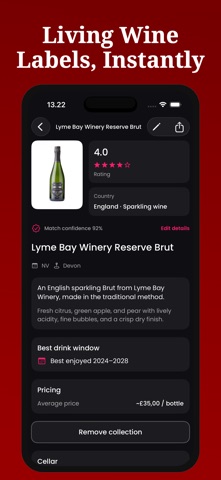
A real bottle example from the app screenshot
The official screenshot above shows Lyme Bay Winery Reserve Brut and the indication NV. The producer lists a Brut Reserve Sparkling — NV. Compare those identifiers rather than expecting the words to appear in exactly the same order.
| Visible in the screenshot | How to use it |
|---|---|
| Lyme Bay Winery | Match the producer before trusting a similar bottle name. |
| Reserve Brut and NV | Check the specific release and non-vintage indication; do not invent a harvest year. |
| Match confidence and rating | These are app-displayed values, not an independently measured accuracy result or proof of a community review. |
| Estimated bottle price | Check a current retailer offer before using the number for a purchase decision. |
This is an explanation of an existing product screenshot, not a new scan test. It does not establish recognition accuracy, provenance, or a current price.
Why a label scan can fail, and what to try
| Problem | Next step |
|---|---|
| Glare hides the producer | Move the bottle or camera until the text is readable, then retake the picture. |
| Vintage is outside the frame | Include the whole label and compare the year manually. |
| Result is a different cuvée | Search the producer and exact bottling name together instead of accepting the closest match. |
| Only a tiny bottle appears in an old photo | Use any readable words for manual search; enlarging a blurry image cannot recover missing label detail. |
| AI analysis is unavailable | Check connectivity, read the error, and retry later if the service or usage limit prevents a request. |
Observed scan results: two bottles and a non-label control
On November 4, 2026, we sent two producer-published bottle photos to Pour’s production image-analysis backend, using the same English identification prompt as the app. We did not supply wine names or the producer’s page text in the requests. A third request used Pour’s app icon as a non-label control.
| Input | Observed output | What still needed checking |
|---|---|---|
| Lyme Bay Brut Reserve photo | Lyme Bay Winery Reserve Brut; NV | Identity matched. The generated price estimate was GBP 35, while the producer’s page offered GBP 26.99 when checked. Confirm shop prices separately. |
| Lyme Bay Shoreline 2024 photo | Lyme Bay Winery Shoreline; 2024 | Identity and vintage matched. Region was returned as unknown; price and ABV were not provided. |
| Pour’s wine-glass app icon | Not a wine label; no wine name returned | A wine-themed illustration is not enough to identify a bottle. |
These were clean product-image checks, not physical-bottle camera tests. Two bottles from one producer cannot establish a general accuracy rate. We did not test glare, blur, or other producers, and another run can differ. The price discrepancy and missing fields show why a plausible identity does not validate every generated detail.
Read the check method, image sources, input hashes and observed fields. The producer photographs are linked for provenance and are not republished here.
A worked example of verification
Imagine a label that reads “Example Estate — Reserve — 2021.” A result for “Example Estate — Classic — 2022” is a mismatch even if the producer is correct. Retake the photo with “Reserve” and “2021” clearly visible, or search using all three terms. This is an illustrative example, not a tested scan of a real wine.
When a scanner cannot resolve the bottle
Read the back label for extra clues and check the producer’s own information to confirm the release. A scanner may infer details from incomplete text. Rare wines, similar labels, and obscured vintages need extra checking. An estimated price is not a live retailer offer, and a generated rating is not your personal tasting score.
Save a useful record
Keep the vintage and quantity accurate when adding a bottle to your cellar. Add your own tasting notes after opening it so your next choice reflects your experience. If you have a saved picture, use the photo-import walkthrough. For several bottles, start with the inventory checklist and free CSV template.